How do I customise my invoices and quotes?
This page refers to document templates that are sent to customers in PDF format. To edit the notification messages sent to customers, see How do I customise message templates?
When you generate an invoice, quote, itemisation or payment receipt in getSoapy, a PDF document is created. Customers can view these documents via the customer portal.
getSoapy customises these documents for you, using your logo, business name, tagline, address and tax ID entered in Tools > Settings > Business > Business Details. You can edit the text that appears on these documents and add images or links to your business documents by following the steps below:
Go to
Tools>Settings>Communication>Document templatesor search forDocument templates.Select the document you want to customise (Invoice, Quote, Itemisation, or Payment receipt).
See our tips below on editing these documents. When you're done, scroll down and click
Saveto apply your changes.
The Business details header and the previews of line items and linked documents are filled in automatically from elsewhere in getSoapy. Tap the information (i) icon next to each one for more info. Turn off Business details header if you don't want your logo and business details at the top of the document.
For help editing your logo, business name, tagline, or address, see How do I edit my business details?
For help configuring linked documents, see How do I add my business documents?
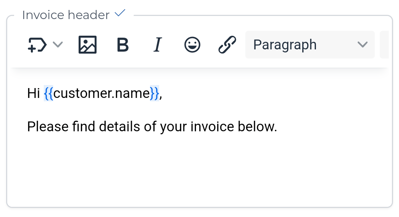
The header and footer of each document have default text and use merge tags to auto-populate these documents with dynamic, personalised data such as the customer's name and a link to the customer portal. You can edit the text and use the text editor to:
To see all of these options on a mobile device, scroll along the toolbar.
- insert other merge tags (see What are merge tags?)
- insert advanced merge tags (see What are advanced merge tags?)
- insert images
- make text bold
- make text italic
- insert emojis
- insert hyperlinks
- change the text format (headings or paragraph) using the style drop-down menu
- change the font size using the drop-down menu
- insert or edit a table
- change text alignment
- insert bullet points or a numbered list
- adjust the text indent (increase or decrease)
- edit the header/footer source code (HTML)